| |
python环境
- 裸python=python解释器 +pip模块(用来安装库的)
- anaconda=python解释器+conda模块(≈pip+python版本的管理软件)+“预制库 ”
pip的使用
1. 📦 安装与卸载 (Install & Uninstall)
最核心的日常操作。
| 命令 | 说明 | 示例 |
|---|---|---|
pip install [包名] | 安装最新版本的包 | pip install pandas |
pip install [包名]==[版本] | 安装指定版本 | pip install numpy==1.19.2 |
pip install [包名]>=[版本] | 安装大于等于某版本的包 | pip install "requests>=2.20" |
pip install --upgrade [包名] | 升级包到最新版 (简写 -U) | pip install -U pandas |
pip uninstall [包名] | 卸载包 | pip uninstall pandas |
pip uninstall -y [包名] | 卸载包且不需要确认 (自动 Yes) | pip uninstall -y pandas |
python -m pip install -U pip | 升级 pip 自身 | (当 pip 提示版本过旧时使用) |
2. 📝 项目依赖管理 (Requirements)
在部署项目或迁移环境时使用。
| 命令 | 说明 | 示例 |
|---|---|---|
pip freeze > requirements.txt | 将当前环境所有包导出到文件 | 用于锁定项目依赖版本 |
pip install -r requirements.txt | 根据文件批量安装包 | 用于在新环境中部署项目 |
pip list --format=freeze | 以 freeze 格式输出但不保存 | 查看纯净的包列表 |
3. 🔍 查看与检查 (Inspect & Check)
了解当前环境里装了什么。
| 命令 | 说明 | 示例 |
|---|---|---|
pip list | 列出已安装的所有包 | |
pip list --outdated | 列出所有有新版本的包 | 检查哪些包可以升级 |
pip show [包名] | 显示包的详细信息(路径、依赖) | pip show numpy |
pip show -f [包名] | 显示包安装了哪些具体文件 | pip show -f requests |
pip check | 检查已安装包的依赖冲突 | 用于排查 “Dependency Error” |
4. 🚀 镜像加速与配置 (Mirrors & Config)
解决国内下载慢的问题。
| 命令 | 说明 | 示例 |
|---|---|---|
-i [URL] (临时) | 仅本次安装使用指定镜像 | pip install -i https://pypi.tuna.tsinghua.edu.cn/simple pandas |
pip config set global.index-url [URL] | 永久修改下载源 | (见下方推荐源地址) |
pip config list | 查看当前的配置信息 | |
pip cache purge | 清除 pip 的下载缓存 | 释放磁盘空间 |
国内常用镜像源 (URL):
清华:
https://pypi.tuna.tsinghua.edu.cn/simple阿里:
https://mirrors.aliyun.com/pypi/simple/腾讯:
https://mirrors.cloud.tencent.com/pypi/simple
5. 🛠 特殊参数 (Advanced Flags)
解决特定场景下的棘手问题。
| 参数 | 说明 | 场景 |
|---|---|---|
--user | 安装到用户目录 (无需 Admin 权限) | 解决 Permission denied 报错 |
--no-cache-dir | 禁用缓存,强制重新下载 | 解决安装包损坏或哈希不匹配问题 |
--pre | 允许安装预览版 (Pre-release) | 想尝鲜测试版功能时使用 |
--proxy [http://ip:port] | 设置代理服务器 | 公司内网或特殊网络环境 |
--timeout [秒] | 设置超时时间 (默认 15秒) | 网络极差时防止连接断开 |
💡 常见组合技示例
强制重装某个包 (忽略缓存):
Bash
1pip install --force-reinstall --no-cache-dir pandas批量升级所有包 (Linux/Mac):
(Windows 下通常需要写脚本)
Bash
1pip list --outdated --format=freeze | grep -v '^\-e' | cut -d = -f 1 | xargs -n1 pip install -U安装本地
.whl文件:Bash
1pip install ./Downloads/numpy-1.21.0-cp39-win_amd64.whl
我可以为你做的下一步:
如果这份速查表对你有帮助,你是否需要我针对 conda (Anaconda 的包管理器) 也整理一份类似的速查表,以便对比使用?
anaconda的使用
anaconda是一个发行版,=python+conda+vscode+pycharm+jupternote+(20w个可以随时使用的库) channel是anaconda中下载包的源,有defaults和conda-forge还有bioconda等渠道,类似于使用pip时用的清华源
python基本语法
数据类型
运算
控制结构
函数
类与对象
python高级语法
pass
python如何查找使用模块
- 在哪里找库:
- pypi 搜话题就行
- 问ai
- 都有哪些库,对库的应用进行分类
- pypi有topic分类
- 👉python常见库
- 找到的库如何研究源代码:
- 直接查看源文件
- 在python中打印部分函数,全文,或者__all__,等
- 使用pydoc查看模块介绍文档等
| |
- 如何查看依赖
- 自定义模块
python常见模块cheat sheet
1. 🐍 内置函数 (Built-in Functions)
无需 import,任何地方都能直接用。
🔢 数学与数字 (Math & Numbers)
| 函数 | 说明 | 示例 |
|---|---|---|
abs(x) | 绝对值 | abs(-5) -> 5 |
round(x, n) | 四舍五入 (保留 n 位) | round(3.14159, 2) -> 3.14 |
pow(x, y) | x 的 y 次方 | pow(2, 3) -> 8 |
divmod(x, y) | 返回 (商, 余数) | divmod(10, 3) -> (3, 1) |
sum(iterable) | 求和 | sum([1, 2, 3]) -> 6 |
min() / max() | 最小值 / 最大值 | max(5, 1, 9) -> 9 |
🔄 数据类型转换 (Type Conversion)
| 函数 | 说明 | 示例 |
|---|---|---|
int() / float() | 转整数 / 转浮点 | int("10") |
str() / bool() | 转字符串 / 转布尔 | bool(0) -> False |
list() / tuple() | 转列表 / 转元组 | list((1,2)) -> [1, 2] |
set() / dict() | 转集合 / 转字典 | set([1,1,2]) -> {1, 2} |
bin() / hex() | 转二进制 / 转十六进制 | hex(255) -> '0xff' |
🔁 迭代与循环助手 (Iteration & Looping)
| 函数 | 说明 | 示例 (核心用法) |
|---|---|---|
range(start, stop) | 生成序列 | for i in range(5): |
len(s) | 获取长度 | len("hello") -> 5 |
enumerate(seq) | 同时获取 索引 和 值 | for i, v in enumerate(['a','b']): |
zip(a, b) | 将两个列表打包成对 | zip([1,2], ['a','b']) |
sorted(seq) | 返回排序后的新列表 | sorted([3,1,2]) -> [1,2,3] |
reversed(seq) | 反转迭代器 | list(reversed([1,2,3])) |
map(func, seq) | 对所有元素执行 func | map(str, [1, 2, 3]) |
filter(func, seq) | 过滤保留 True 的元素 | filter(lambda x: x>5, data) |
🕵️ 对象检查与逻辑 (Inspection & Logic)
| 函数 | 说明 | 示例 |
|---|---|---|
type(obj) | 查看对象类型 | type(1) is int |
isinstance(obj, cls) | 检查类型 (推荐) | isinstance(1, int) -> True |
id(obj) | 对象的内存地址 | id(x) |
dir(obj) | 列出对象所有属性/方法 | dir([]) (查看列表的方法) |
help(obj) | 查看帮助文档 | help(print) |
all(seq) | 全为真则 True | all([True, 1, "yes"]) |
any(seq) | 只要有一个真则 True | any([False, 0, "yes"]) |
⌨️ 输入输出 (I/O)
| 函数 | 说明 | 示例 |
|---|---|---|
print(*objects) | 打印 | print("Hello", end="") |
input(prompt) | 获取用户输入 | name = input("Who are you?") |
open(file, mode) | 打开文件 | with open("f.txt", "w") as f: |
2. 📚 常用标准库模块 (Standard Libraries)
无需 pip install,只需 import 即可使用。
📂 文件与系统 (File & OS)
os: 老牌系统接口。os.listdir(),os.mkdir(),os.environ.get()
sys: 解释器相关。sys.argv(命令行参数),sys.path(导包路径),sys.exit()
pathlib(🌟推荐): 现代化的路径操作,面向对象。Path('folder/file.txt').read_text()
shutil: 高级文件操作。shutil.copy(),shutil.move(),shutil.rmtree()(删文件夹)
📅 时间与日期 (Time & Date)
time: 时间戳与休眠。time.time(),time.sleep(1)
datetime: 复杂的日期处理。datetime.now(),timedelta(days=1)(时间加减)
🧮 数据处理与结构 (Data & Structures)
json: JSON 序列化。json.dumps()(转字符串),json.loads()(解析字符串)
collections: 增强型数据结构。Counter(统计词频),defaultdict(带默认值的字典)defaultdict的意思是,访问一个没有对应键的字典会报错,而这个不会,反而会初始化一个键来保存值,不是nltk的字典
random: 随机数。random.randint(1,10),random.choice(list),random.shuffle(list)
math: 高级数学。math.sqrt(),math.sin(),math.pi
📝 文本与正则 (Text & Regex)
re: 正则表达式。re.search(),re.findall(),re.sub()(替换)
string: 字符串常量。string.ascii_lowercase,string.digits
🌐 网络与并发 (Network & Concurrency)
urllib.request: 发送简单的 HTTP 请求。threading: 多线程。subprocess: 调用外部命令 (如 git, ls)。subprocess.run(["ls", "-l"])
http.server: 它能在你的电脑上瞬间启动一个简单的 Web 服务器。它会将当前终端所在的文件夹作为网站的根目录,把里面的文件展示出来。但是是单线程的
🐛 调试与开发 (Debug & Dev)
logging: 记录日志 (比 print 好用)。pdb: 调试器。import pdb; pdb.set_trace()(设置断点)
💡 3 个隐藏的超级技巧
一行代码开启 Web 服务器:
想快速分享当前文件夹的文件给局域网同事?
1
2
3
4
# 在终端运行 python -m http.server 8080 # 可以使用ipconfig查看当前局域网ipv4,然后手机访问192.168.-.-:8080,就能访问当前文件夹了 # 本地电脑浏览器也可以使用localhost:8080优雅地打印字典/JSON:
使用
pprint(Pretty Print) 模块。1 2 3from pprint import pprint complex_dict = {'status': 200, 'data': {'users': [{'id': 1, 'name': 'Alice', 'roles': ['admin', 'editor']}, {'id': 2, 'name': 'Bob', 'roles': ['user']}]}, 'message': 'success'} pprint(complex_dict)快速统计列表元素:
1 2 3 4from collections import Counter words = ['apple', 'banana', 'apple', 'apple'] print(Counter(words)) # 输出: Counter({'apple': 3, 'banana': 1})
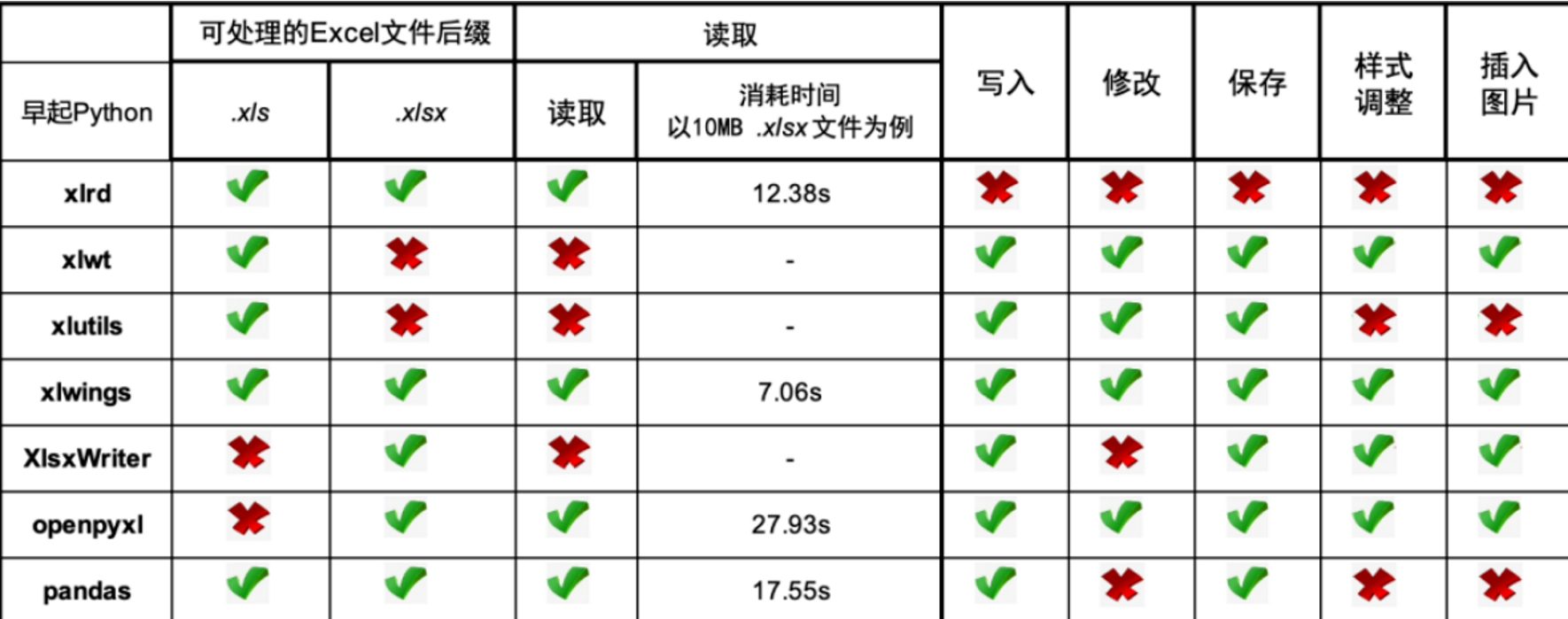
3. 🔥python excel自动化
4. 😶🌫️string的内置方法
⚠️内置方法是类方法或者对象方法,而不是普通通用的函数,更不是内置模块中的函数。这里是string数据类型的对象实例所使用的方法,比如将str1=‘string’的首字母大写;内置 String 模块,这是一个标准库,需要 import string 才能使用。 在现代 Python (3.x) 中,它的主要作用是存储一些常用的字符集合(常量),防止你手动输入出错。 👉string模块cheat sheet
⚠️由于字符串在 Python 中是不可变 (Immutable) 的,请记住:以下所有修改类的方法,都不会改变原字符串,而是返回一个新的字符串。
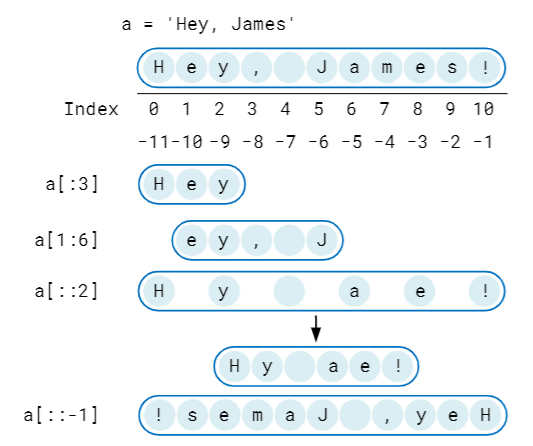
🔥string的索引方法
🔥% 占位符格式化
| % 占位符 | 解释 | 例子 |
|---|---|---|
| %c | 单个字符 | 'The first letter of Python is %c' % 'P' |
| %s | 字符串 | 'Welcome to the world of %s!' % 'Python' |
| %i | 整数 | 'Python has %i letters.' % len('Python') |
| %f | 浮点数 | number = 1.8888 |
| %o | 八进制整数 | number = 12; print("%i in octal is %o" % (number, number)) |
| %e | 科学计数 | number = 12000; print("%i is %.2e" % (number, number)) |
🔥 .format() 常用样式示例
| 样式 | 解释 | 例子 |
|---|---|---|
| :.2f | 浮点数后两位 | "{:.2f}".format(3.1415926) # '3.14' |
| :% | 百分数 | "{:%}".format(3.1415926) # '314.159260%' |
| :.2% | 百分数,小数点后两位 | "{:.2%}".format(3.1415926) # '314.16%' |
| :.2e | 科学计数 | "{:.2e}".format(3.1415926) # '3.14e+00' |
| :, | 千位加逗点 | "{:,}".format(3.1415926*1000) # '3,141.5926' |
🔠 大小写转换 (Case Conversion)
| 函数 | 描述 | 示例 | 结果 |
|---|---|---|---|
s.lower() 🔥 | 转为全小写 | 'Hi'.lower() | 'hi' |
s.upper() 🔥 | 转为全大写 | 'Hi'.upper() | 'HI' |
s.title() | 单词首字母大写 | 'hello world'.title() | 'Hello World' |
s.capitalize() | 仅首字母大写 | 'hello world'.capitalize() | 'Hello world' |
s.swapcase() | 大小写反转 | 'Hi'.swapcase() | 'hI' |
s.casefold() | 强力小写 (多语言) | 'ß'.casefold() | 'ss' |
🧹 去除空白与清理 (Stripping & Cleaning)
| 函数 | 描述 | 示例 | 结果 |
|---|---|---|---|
s.strip([chars]) 🔥 | 去除两端空白/字符 | ' xy '.strip() | 'xy' |
s.lstrip([chars]) | 去除左端 (Left) | ' xy '.lstrip() | 'xy ' |
s.rstrip([chars]) | 去除右端 (Right) | ' xy '.rstrip() | ' xy' |
s.removeprefix(fix) | (3.9+) 移除前缀 | 'Mr.A'.removeprefix('Mr.') | 'A' |
s.removesuffix(fix) | (3.9+) 移除后缀 | 'test.py'.removesuffix('.py') | 'test' |
🔗 拆分与连接 (Splitting & Joining)
| 函数 | 描述 | 示例 | 结果 |
|---|---|---|---|
s.split(sep) 🔥 | 按符拆分为列表 | 'a b'.split() | ['a', 'b'] |
s.rsplit(sep) | 从右开始拆分 | 'a b c'.rsplit(None, 1) | ['a b', 'c'] |
s.splitlines() 🔥 | 按行拆分 | 'a\nb'.splitlines() | ['a', 'b'] |
sep.join(iter) 🔥 | 用符拼接列表 | '-'.join(['a', 'b']) | 'a-b' |
s.partition(sep) | 切为3段元组 | 'a=1'.partition('=') | ('a','=','1') |
🔍 查找与替换 (Search & Replace)
| 函数 | 描述 | 示例 | 结果 |
|---|---|---|---|
s.find(sub) 🔥 | 找索引 (失败返 -1) | 'hi'.find('i') | 1 |
s.index(sub) | 找索引 (失败报错) | 'hi'.index('x') | Error |
s.count(sub) 🔥 | 统计出现次数 | 'aa'.count('a') | 2 |
s.replace(o, n) 🔥 | 替换文本 | '1-1'.replace('-',':') | '1:1' |
s.startswith(pre) | 检查开头 | 'abc'.startswith('a') | True |
s.endswith(suf) 🔥 | 检查结尾 | 'pic.jpg'.endswith('.jpg') | True |
🧐 内容判断 (Inspection / Is…)
| 函数 | 描述 | 示例 | 结果 |
|---|---|---|---|
s.isalpha() | 全为字母 (含汉字) | 'abc' | True |
s.isdigit() 🔥 | 全为数字 | '123' | True |
s.isalnum() | 字母或数字 | 'a1' | True |
s.isspace() | 全为空白符 | ' \t' | True |
s.islower() | 全为小写 | 'abc' | True |
s.isupper() | 全为大写 | 'ABC' | True |
s.istitle() | 单词首字母大写 | 'The End' | True |
📏 格式化与对齐 (Formatting & Alignment)
| 函数 | 描述 | 示例 | 结果 |
|---|---|---|---|
s.center(w) | 居中 | 'A'.center(3) | ' A ' |
s.ljust(w) | 左对齐 | 'A'.ljust(3) | 'A ' |
s.rjust(w) | 右对齐 | 'A'.rjust(3) | ' A' |
s.zfill(w) | 右对齐补零 | '5'.zfill(3) | '005' |
f"{var}" 🔥 | f-string (推荐) | f'Hi {name}' | 'Hi Py' |
🔄 编码 (Encoding)
| 函数 | 描述 | 示例 | 结果 |
|---|---|---|---|
s.encode() | Str ➡ Bytes | 'Hi'.encode('utf8') | b'Hi' |
b.decode() | Bytes ➡ Str | b'Hi'.decode('utf8') | 'Hi' |
💡 核心易错点
❌ 误区:
string.upper()会改变原变量。- ✅ 真相:字符串不可变,必须赋值:
s = s.upper()
- ✅ 真相:字符串不可变,必须赋值:
❌ 误区:
list.join('-')- ✅ 真相:分隔符在前面:
'-'.join(list)
- ✅ 真相:分隔符在前面:
❌ 误区:
find找不到会报错。- ✅ 真相:
find返回-1(安全),index才会报错。
- ✅ 真相:
string模块cheat sheet
虽然现代 Python 中大部分“动作”都移到了内置的字符串方法里,但 string 模块依然是处理字符集常量和模板替换的神器,特别是在涉及密码生成、数据清洗、安全格式化等进阶场景时。
记得先导入:import string
1. 🧱 常用字符常量 (Constants)
这些是构建验证码、密码生成器或数据清洗规则的“原材料”。
| 常量名 | 描述 | 内容 (部分展示) |
|---|---|---|
string.ascii_letters 🔥 | 所有英文字母 (大小写) | 'abcdef...WZ' |
string.ascii_lowercase | 所有小写字母 | 'abcdef...z' |
string.ascii_uppercase | 所有大写字母 | 'ABCDEF...Z' |
string.digits 🔥 | 所有数字字符 | '0123456789' |
string.hexdigits | 十六进制字符 | '0123...abc...ABC...F' |
string.octdigits | 八进制字符 | '01234567' |
string.punctuation 🔥 | 所有标点符号 | '!"#$%&\'()*+,-./...' |
string.whitespace | 所有空白符 (含换行/制表) | ' \t\n\r\x0b\x0c' |
string.printable | 所有可打印字符 | (包含以上所有 + 空格) |
2. 🛠️ 实用工具与类 (Utilities & Classes)
除了常量,这里还有几个鲜为人知但好用的工具。
| 名称 | 类型 | 描述 | 示例 |
|---|---|---|---|
string.capwords(s) | 函数 | 智能标题化 (分割->首字母大写->合并) | string.capwords('hi py') ➡ 'Hi Py' |
string.Template 🛡️ | 类 | 安全的字符串替换 (使用 $ 符) | (见下方进阶用法) |
💡 提示:
capwords和内置方法.title()的区别在于:capwords会先用split()归一化空格,这在处理不规则空格文本时更干净。
3. 🚀进阶用法 (Advanced Usage)
这里展示 3 个 string 模块最强大的实战场景,这也是区分新手和高手的关键。
场景 A: ⚡ 极速数据清洗 (去除所有标点)
比写正则 (Regex) 更快、更易读的清洗方式。
| |
场景 B: 🛡️ 安全的字符串替换 (Template)
当格式化字符串来自用户输入时,使用 f-string 或 .format() 可能导致程序崩溃或安全注入。Template 是更安全的选择。
| |
场景 C: 🔐 随机密码/验证码生成
结合 secrets (比 random 更安全) 和 string 常量。
| |
🆚 核心对比:Template vs f-string
| 特性 | f-string / .format() | string.Template |
|---|---|---|
| 语法 | f"Hello {name}" | Template("Hello $name") |
| 性能 | ⭐⭐⭐⭐⭐ (极快) | ⭐⭐⭐ (稍慢) |
| 灵活性 | 高 (支持表达式 f"{a+1}") | 低 (仅支持简单变量替换) |
| 容错性 | 低 (缺变量会报错 KeyError) | 高 (用 safe_substitute 可忽略缺失) |
| 适用场景 | 内部开发代码 | 处理外部用户输入的模板 (如邮件模版) |
math模块cheat sheet
random模块cheat sheet
stastics模块cheat sheet
copy模块cheat sheet
os、sys模块cheat sheet
numpy模块cheat sheet
pandas模块cheat sheet
matplotlib模块cheat sheet
- matplotlib 画所有图
- plotly 画交互的图
- seaborn 画跟统计学有关的图更方便
核心理念:Figure (画布) 是底座,Axes (坐标系) 是画纸。尽量操作 Axes。 记得先导入:
import matplotlib.pyplot as plt
1. 🏗️ 核心架构 (The OO Pattern)
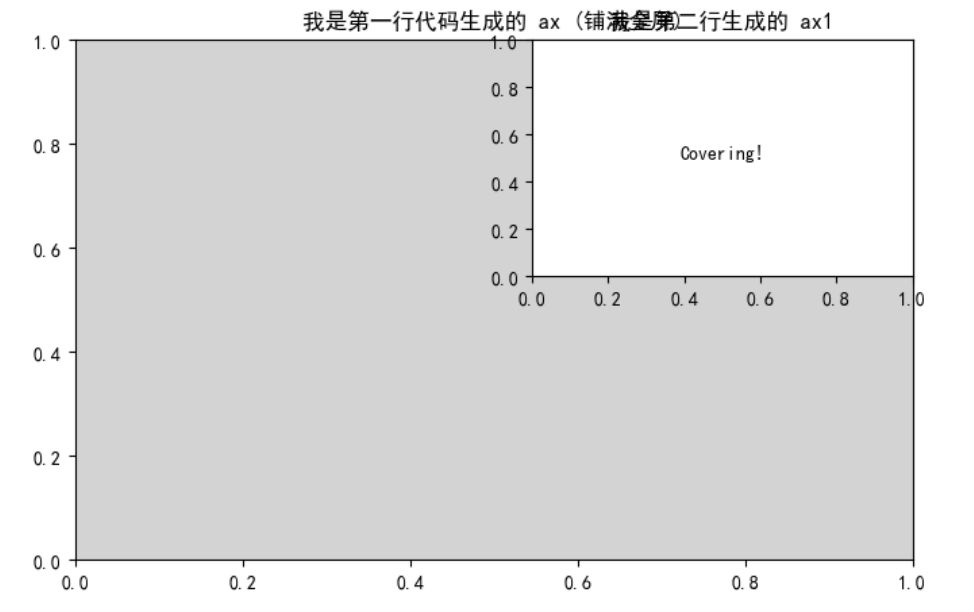
别再只用 plt.plot() 了!使用 fig, ax 模式能让你精准控制图表的每一个细节。
| |
| 功能 | import matplotlib.pyplot as plt | fig, ax = plt.subplots() |
|---|---|---|
| 创建新的图形 | plt.figure() | plt.figure()\ plt.subplots() |
| 创建新的子图 | plt.subplot()!=plt.subplots() | ax = fig.add_subplot() |
| 创建折线图 | plt.plot() | ax.plot() |
| 添加横轴标签 | plt.xlabel() | ax.set_xlabel() |
| 添加纵轴标签 | plt.ylabel() | ax.set_ylabel() |
| 添加标题 | plt.title() | ax.set_title() |
| 设置横轴范围 | plt.xlim() | ax.set_xlim() |
| 设置纵轴范围 | plt.ylim() | ax.set_ylim() |
| 添加图例 | plt.legend() | ax.legend() |
| 添加文本注释 | plt.text() | ax.text() |
| 添加注释 | plt.annotate() | ax.annotate() |
| 添加水平线 | plt.axhline() | ax.axhline() |
| 添加垂直线 | plt.axvline() | ax.axvline() |
| 添加背景网格 | plt.grid() | ax.grid() |
| 保存图形到文件 | plt.savefig() | fig.savefig() |
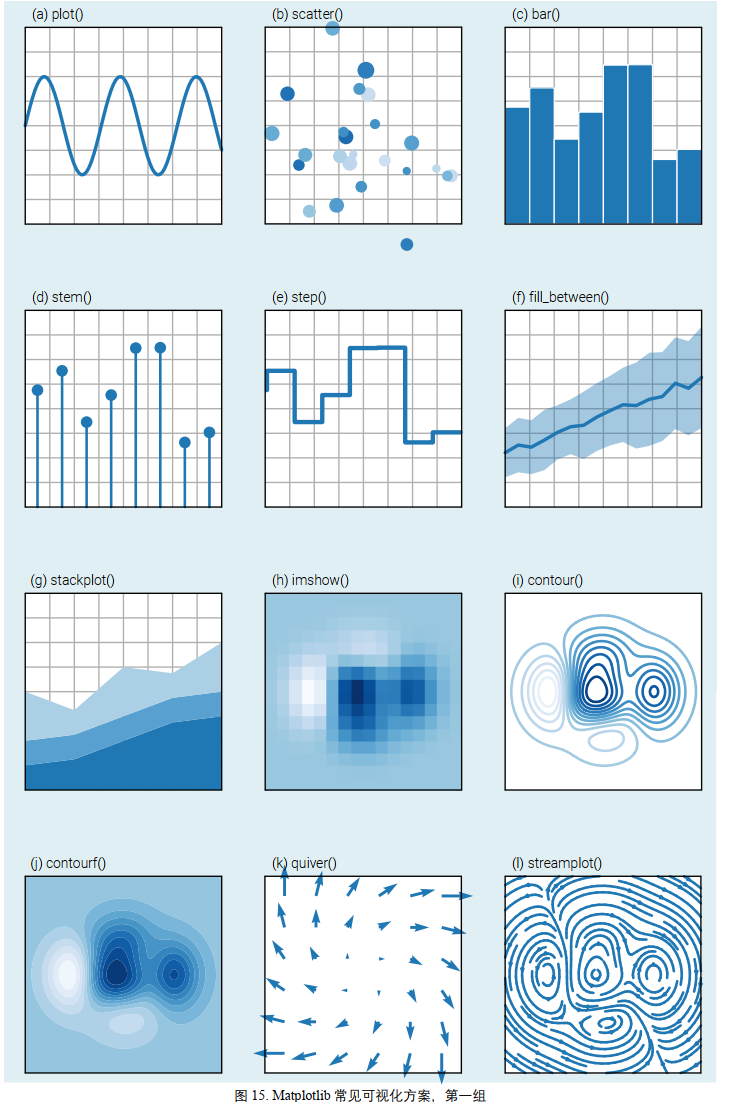
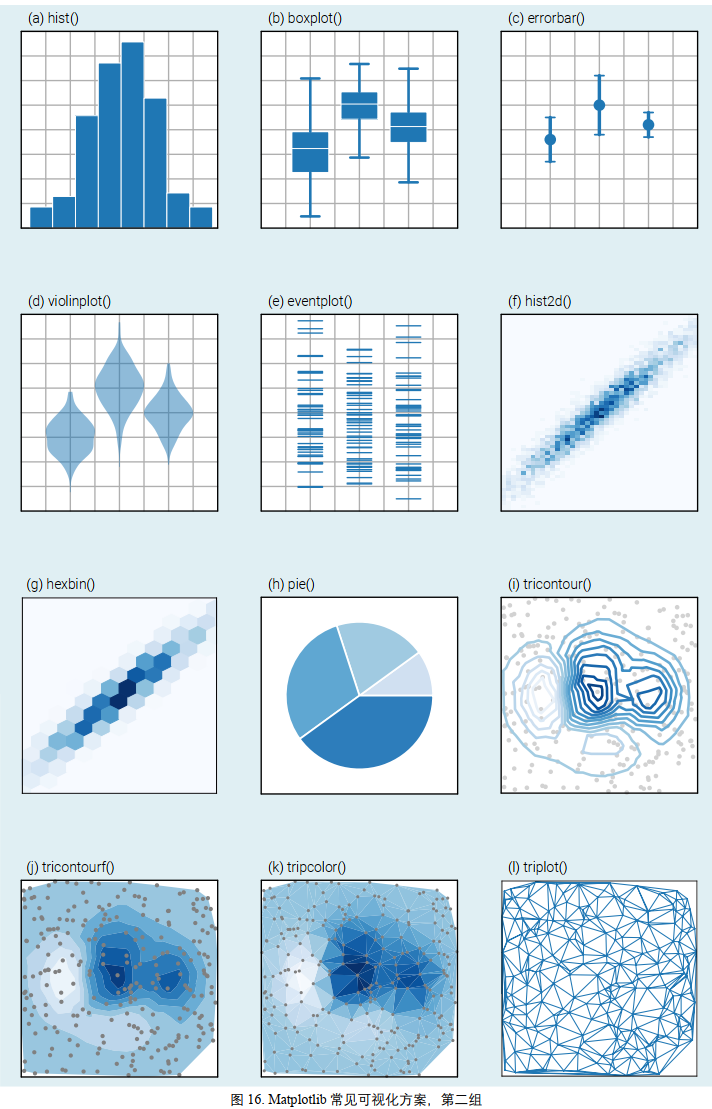
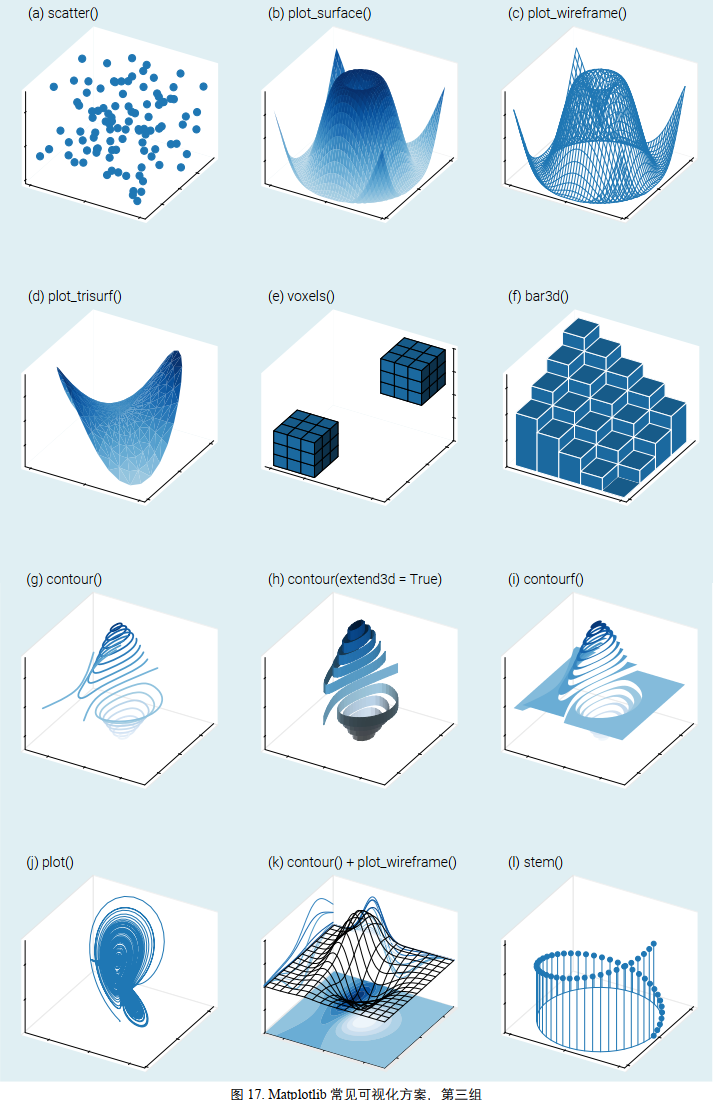
2. 📈 常用图表类型 (Plot Types)
均假设 fig, ax = plt.subplots() 已创建。
| 方法 | 描述 | 示例代码 | 关键参数 |
|---|---|---|---|
ax.plot() 🔥 | 折线图 | ax.plot(x, y) | linestyle='--', marker='o' |
ax.scatter() 🔥 | 散点图 | ax.scatter(x, y) | s=size, c=color, alpha=0.5 |
ax.bar() | 柱状图 (竖直) | ax.bar(x, height) | width=0.8, color='b' |
ax.barh() | 条形图 (水平) | ax.barh(y, width) | height=0.5 |
ax.hist() | 直方图 (分布) | ax.hist(data) | bins=20, density=True |
ax.boxplot() | 箱线图 (统计) | ax.boxplot(data) | vert=False (水平箱线) |
ax.imshow() | 热力图/图片 | ax.imshow(matrix) | cmap='viridis', interpolation='nearest' |
ax.pie() | 饼图 | ax.pie(sizes) | autopct='%1.1f%%', explode=[0.1, 0] |
 |  |
|---|---|
 |
3. 🎨 装饰与美化 (Styling & Labeling)
注意:在 OO 模式下,很多命令变成了 set_ 开头。
| 目标 | OO 模式命令 (ax.xxx) | 说明 |
|---|---|---|
| 标题 | ax.set_title("Text") | 设置图表标题 |
| 标签 | ax.set_xlabel("X Label") | 设置 X/Y 轴名称 |
| 范围 | ax.set_xlim(0, 10) | 设置轴的显示范围 |
| 刻度 | ax.set_xticks([0, 5, 10]) | 自定义刻度位置 |
| 网格 | ax.grid(True) | 显示网格线 (linestyle=':') |
| 图例 | ax.legend(loc='best') 🔥 | 必须先在 plot 里加 label='name' |
| 文本 | ax.text(x, y, "Note") | 在指定坐标写字 |
| 箭头 | ax.annotate(...) | (见下方进阶用法) |
4. 🖼️ 多子图布局 (Subplots Layout)
在一张图上画多个表。
| |
5. 🚀 进阶用法 (Advanced & Pro Tips)
场景 A: 🇨🇳 解决中文乱码 (Chinese Support)
Matplotlib 默认不支持中文,这是新手必坑。
| |
场景 B: 🏷️ 高级标注 (Annotation)
比 text 更高级,带箭头指向
| |
场景 C: 👯♂️ 双坐标轴 (Dual Axis)
两个数据量级完全不同(比如 温度 vs 降雨量)画在同一张图。
| |
场景 D: 💾 保存图片 (Saving)
不要截图,用代码存,清晰度无限高。
| |
场景 E: 💅 一键美颜 (Style Sheets)
觉得自己配色丑?用内置主题。
| |
6. 🚀 进阶的进阶用法
这里就不一一展开介绍用法和cheatsheet了,要不然文本就太臃肿了(本来就很臃肿了😬)👉python cheatsheet Vault
| 子模块 | 常见用途 | 示例场景 |
|---|---|---|
matplotlib.image | 图像处理 | 读取和显示图片文件 (mpimg.imread) |
matplotlib.animation | 制作动画 | 让图表动起来,生成 GIF 或 MP4 |
matplotlib.colors | 颜色映射 | 制作热力图时自定义渐变色 (LogNorm, ListedColormap) |
matplotlib.ticker | 刻度控制 | 比如要把坐标轴刻度变成 “$10,000” 这种格式 |
matplotlib.dates | 日期处理 | 专门处理时间序列坐标轴 |
matplotlib.font_manager | 字体管理 | 手动加载特殊的 .ttf 字体文件 |
matplotlib.patches | 绘制形状 | 手动画圆、矩形、多边形(在图上做标记) |
plotly模块cheat sheet
sympy模块cheat sheet
python实战
- 算法竞赛和数据结构
- 数学建模与物理建模
- 软件设计
- .py+bat文件一键运行
- 批处理文件:@echo off 是组合拳,@ 隐藏 echo off 本身,echo off 再关闭后续所有命令的显示。(就是C:\Users\rabitsir\Desktop>git这一行)
- pyinstaller生成exe文件、Nuitka将python转成c/c++再编译但速度慢、
cx_Freeze类似PyInstaller- pyinstaller -F -w -I icon.ico demo.py
-F让程序变成单个文件,-w让程序运行时不弹黑框
- pyinstaller -F -w -I icon.ico demo.py
- python命令行程序?
- 之前的哪个程序搞得能运行就行
- 看看其他有名的命令行程序的代码,造个轮子?还是就学学改进一下之前那个程序然后用python重写也行,主要之后不发展这个技术
- gui软件开发框架
- Electron(js)
- Qt(c/python)
- .py+bat文件一键运行
- Windows app开发技术
- 原生
- Win32api
- Mfc
Maui 跨平台Uwp(被winui3代替而废除)/winui3 未来方向,桌面端Wpf 成熟,桌面端
- 跨平台
- Qt
- Flutter google系 比maui好用,但综合下来没qt好
- web套壳
- Electron
- Cef与electron都基于Chromium
- 原生
- Python app 开发
- 桌面 APP
- Pyside Qt 官方 Python
- Pyqt
- Tkinter标准库 自带,无需安装 但界面非常“老旧”
- Kivy
- PyGObject(GTK)Linux 下非常强GNOME 桌面同款不如 Qt 跨平台
- 手机 APP(Android / iOS)
- Kivy / KivyMD
- PySide6
- Web APP
- Flask/FastAPI 小型网站 / API 后端首选
- Django 适合大型网站
- Streamlit
跨平台 UIFlet(Flutter 的 Python 封装)
图形 / 游戏类 APPPyGame 2D 游戏最经典Arcade 更现代的 2D 游戏框架Panda3DGodot + Python API
命令行 APP(CLI 工具)clicktyperargparse(标准库)
- 桌面 APP